Installing on a supported avatar
Before you install
Read Setting up your environment and get the required files installed before putting Satania Tabako on your avatar.
This guide uses マヌカ. Thank you so much, JINGO!
A lot of people forget to import Satania Tabako Model and Textures.unitypackage and end up with a transparent cigarette or case!
Please double-check this one.
Installing on your avatar
- Install with the tool (recommended)
- Install manually
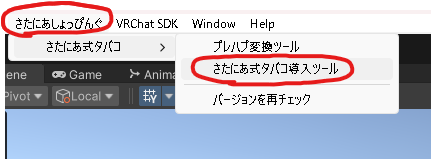
From Unity's top menu, open さたにあしょっぴんぐ (SataniaShopping) → さたにあ式タバコ (Satania Tabako) → さたにあ式タバコ導入ツール (Satania Tabako Install Tool).
Put the avatar you want Satania Tabako on into the アバター (Avatar) slot.
Type in the name of the avatar to search for it, then click アバターに入れる (Put in avatar).
That's it, you're done.
Go to さたにあしょっぴんぐ → Tabako System → Prefab and look for the shop name of the avatar you're installing on. The folder with the shop's name has the prefabs inside. Drag and drop the one you need into your avatar.
That's it, you're done.
Changed the head size?
Read Adjusting only the position in the mouth and adjust the position and angle.
Want to adjust the position yourself?
Read Making an avatar compatible yourself and adjust the position, rotation and size.